Seamless Asset Register & BitzButler Accounting Integration
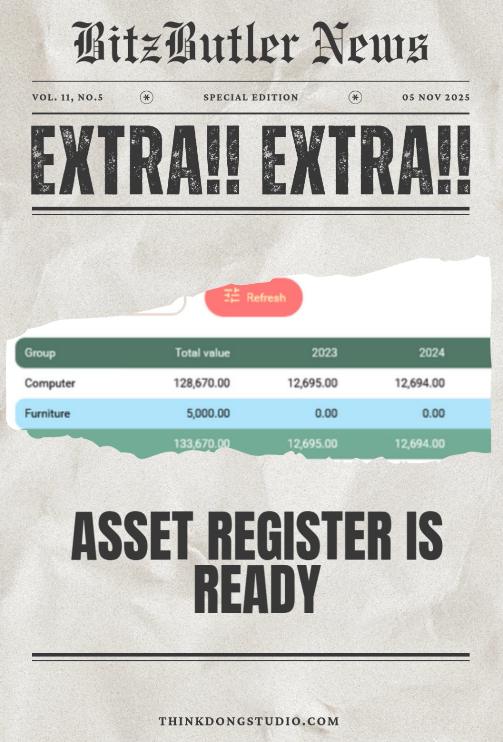
Exciting Update: Effortless Asset Tracking & Depreciation!
🚀 New in BitzButler Asset Register: Track assets, auto-calculate depreciation, handle disposals — no spreadsheets. — no experience required.
Save time. Stay compliant. Plan smarter
Ready to simplify?
Do you have a problem in keeping track your asset values? Or do you have any problem in finding out how much your asset has depreciated?
Table of contents
-
What is the benefits of using an Assset Register or Asset Tracker?
-
- Q: I don’t have any accounting experience, will I be able to understand how to key in the asset detail?
- Q: How user friendly is your Asset Register?
- Q: Can I use Asset Register on a mobile phone like iPhone or Android phone?
- Q: I like the simplicity of your Asset Register, can I use it to track assets without using your accounting system?
- Q: Does your system allows multi-user to access the data concurrently?
- Q: Does your system able to handle the assets for multiple companies?
- Q: Can I key in the asset that was bought many years ago?
- Q: Will there be an issue if I change the depreciation method after generating the depreciation schedule?
- Q: Can I rely on your report to claim Capital Allowance?
📝 Key Takeaways
-
Avoid Miscalculation - key in once and spend your time on other works.😮💨
-
Stay Tax-Ready: - avoid year-end stress with organized, real-time records.💪
-
No Accounting knowledge Needed - BitzButler is designed for owners, not just bookkeepers.🍰
-
Timer Saver - BitzButler is designed to speed up every data entry and reporting.⏰
-
Instant Setup - move from messy asset tracking to a clean dashboard in minutes.🎉
What is an Asset Register
An asset register is one of the key areas in running a business. Every purchase and sale of assets must be recorded so that you know how much you have invested (i.e., the total asset value). Because every asset has a life span (caused by wear and tear), we must calculate the depreciation value and charge it out as operation cost (or expense) on a yearly basis.
Whether an asset has reached its life span or not, we might sell/dispose of it. As a result, the asset has to be removed from the asset register. In this case, we call it asset disposal or just disposal. Any disposal of assets will either generate a disposal gain or loss and it must be recorded on the book as well.
All these details must be tracked in the business account so that the Trading, Profit & Loss and Balance Sheet will be able to reflect the health of a business (through the use of accounting ratio/KPI).
This can be a tedious task since it involves many calculations throughout the years. So, keeping an accurate asset register can be very challenging.
What is depreciation
You can treat the 'depreciation' like a life span of an asset. For example, a vehicle is useful within the first 5 years or a machinery has about a 10 years life span. After reaching the life span, the asset is expected to be either not functioning or requires lots of money in maintaining its working state.
If we convert the 'life span' to a percentage, this percentage will become the 'depreciation percentage'. So, for a vehicle that has a 5 years life span, it depreciates 20% yearly while a machinery has a 10 years life span and it depreciates 10% yearly.
From another perspective, how fast an asset should depreciate? Any asset starts from fully functioning/capacity on day one and reduces in the usefulness gradually on a yearly basis. To put this perspective into the formula, the depreciation method was invented. There are 2 common depreciation methods:
- Straight line method - which depreciates an asset with the same amount on a yearly basis.
- Reducing balance method - which depreciates more in the earlier years and reduces gradually.
For which depreciation method, the useful life and the depreciation percentage, you may consult with your accountant or LHDN/IRB.
Why do we need an Asset Register system
To track the asset in a spreadsheet or manually on a paper is cumbersome and error prone because it is difficult to set up the correct formula for each asset that requires calculating the depreciation schedule for multiple years.
As a result, we developed an Asset Register module to simplify this task. With the BitzButler Asset Register module, you don't need to set up the formula like what you used to do in the spreadsheet.
What is the benefits of using an Assset Register or Asset Tracker?
- No formula is required to set up.
- Posting a journal entry on the depreciation does not require any accounting experience. For example, debit which account and credit which account.
- Posting a journal entry on the asset disposal does not require any accounting experience as well.
- You can see your total asset value summary (or report) in real-time with a Saas system such as BitzButler Asset Register.
- You can find your asset purchase information in the register at any time. No more diving into any messy paper files or PDF files.
- For every asset, there are two types of entry: (1) upon buying the asset and (2) upon disposal of it. You don't need to repeat any data entry on a yearly basis.
- The depreciation schedule will be calculated in real-time automatically.
- The depreciation schedule will be recalculated if the asset value has been changed.
- It is easier to generate reports for yearly tax submission.
- Any changes made by the user will appear in the audit log.👣
- It makes the audit process smoother and easier.
- It improves your cash flow analysis by reviewing the number of assets that you have.
FAQ
Q: I don’t have any accounting experience, will I be able to understand how to key in the asset detail?
A: Yes. You may start using our Asset Register with minimal or no accounting knowledge. As long as you know how to classify your asset by its' nature, it is ok. For example, which asset is computer, vehicle, machinery, etc. We will take care of the rest of it like debiting and crediting which account; how to calculate the depreciation schedule; and how to prepare a Profit & Loss report and Balance Sheet for you. The automated processes are running in real-time and you won't notice their existence.
Q: How user friendly is your Asset Register?
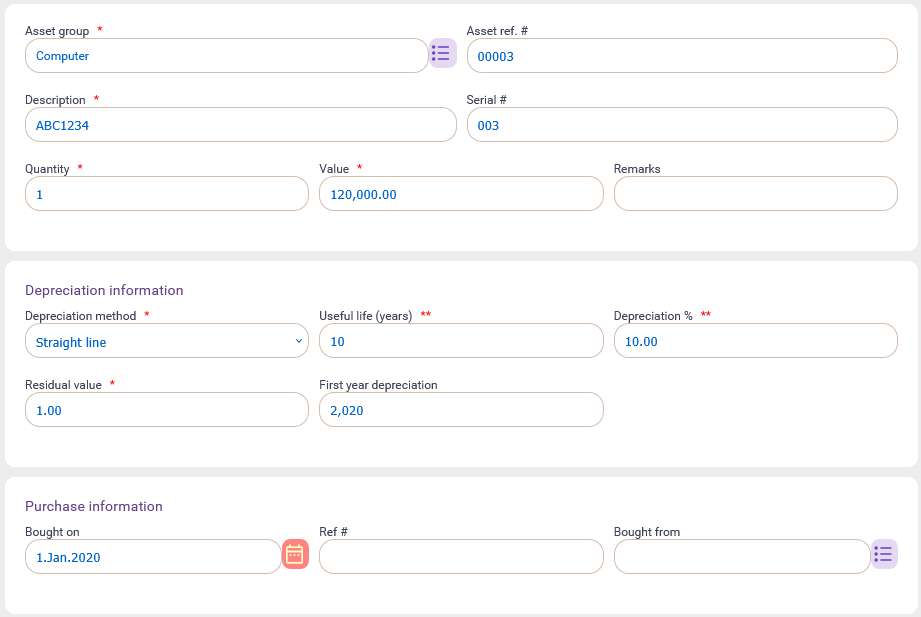
A: We simplified the data entry which the user feels like faster than writing with a pen. Let me show you some screenshots to show you how easy is our Asset Register.
Here's the asset data entry screen which required to key in 4 fields that includes: asset group, description, asset value and bought on. Surprisingly easy?
Q: Can I use Asset Register on a mobile phone like iPhone or Android phone?
A: Currently, BitzButler Asset Register does not support mobile phones because it has a limited screen space. But, you can access it from a tablet device is which has a bigger screen.
Q: I like the simplicity of your Asset Register, can I use it to track assets without using your accounting system?
A: Yes. You can key in your assets into our Asset Register, let the system calculate the depreciation schedule for you and then the system helps you to generate journal posting. After that, you may rely on the suggested journal entry to post into your accounting system.
Q: Does your system allows multi-user to access the data concurrently?
A: Yes. In the situation where two users are updating the same asset, the last change submission will "win".
Q: Does your system able to handle the assets for multiple companies?
A: Yes. In this case, each company needs its' own subscription/database to keep track their assets. In BitzButler, a single user ID allows to operate multiple companies/databases.
Q: Can I key in the asset that was bought many years ago?
A: Yes. Our system does not have any issue on backdated asset entry. You are allowed to key in a building (i.e., an asset) that you bought 20 years ago and run the depreciation schedule.
Q: Will there be an issue if I change the depreciation method after generating the depreciation schedule?
A: No issue on changing the depreciation method as long as you have not posted any journal entry.
Q: Can I rely on your report to claim Capital Allowance?
A: For claiming Capital Allowance, please consult a licensed tax advisor or LHDN/IRB.
BitzButler Asset Register
BitzButler has moved forward one step. Our software now tracks asset values, depreciation and disposals easily.
With this new module, the user will be able to view the depreciation schedule at any time. Posting the yearly depreciation to the Profit & Loss account is a finger click. And no need to use any brain power in recording the asset disposal details and finding out which account to knock off and how the disposal affects the Profit & Loss.
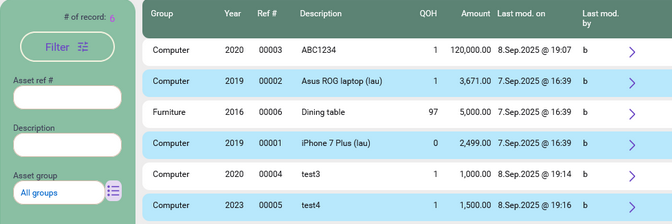
Here's the screenshot of asset register which shows all the assets in your business.
Asset group
Upon signing up with BitzButler, all these common asset groups will be created. As a result, the user does not require any in-depth knowledge in account creation or the depreciation rate.
In case you want to create an additional asset group that does not exist in the common asset group, just tick the "Auto create account" option on the screen and then our system will help in creating the necessary accounts in the Chart of Account.
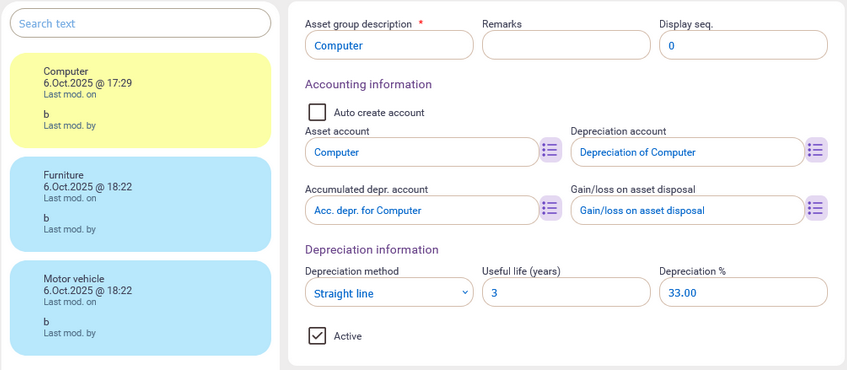
For the depreciation method, useful life and depreciation percentage, you may consult with your accountant or LHDN/IRB.
Asset detail
The asset detail screen will look like this:
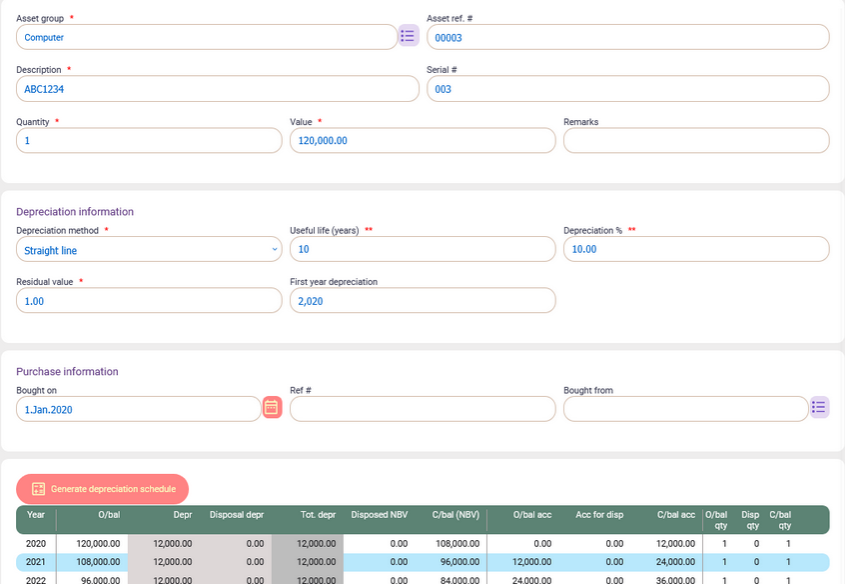
Steps to key in a new asset:
-
You need to key in 4 fields that includes: asset group, description, asset value and bought on. The rest of the information will be automatically populated. To view the depreciation schedule, click on the "Generate depreciation schedule" button.
-
Click Save.
-
To post it to the Accounting system, choose the Post Journal option from the More option (located at the top right).

-
Click Ok to post it.
-
Click OK to open the 'draft' version of the journal. Then, the journal entry for the new asset will appear on the screen.
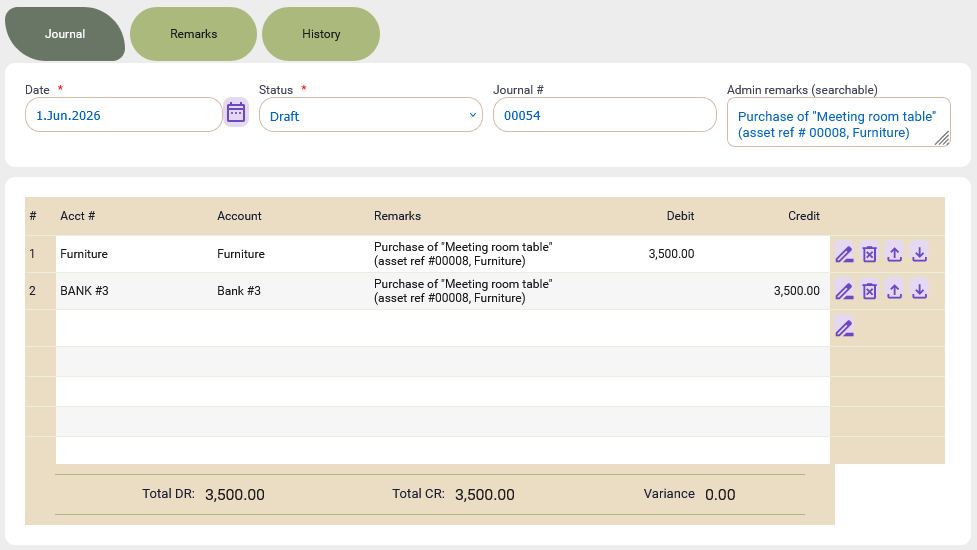
-
If everything looks ok, choose Submitted from the Status drop down.
-
Click Save.
The depreciation schedule for an asset
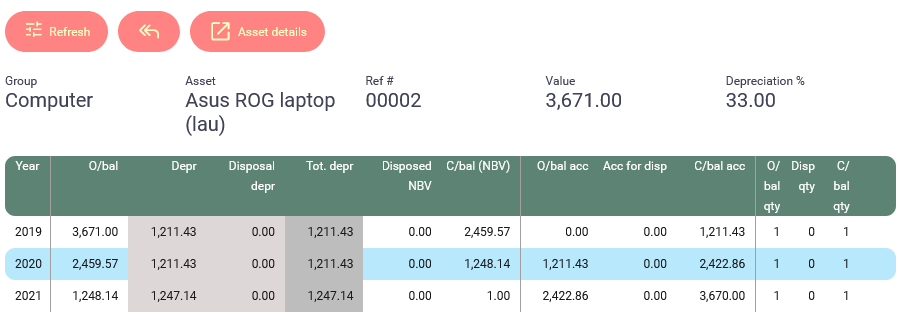
The depreciation schedule can be accessed at any time and our system calculates everything for you. For example, you want to view the depreciation summary for the year.
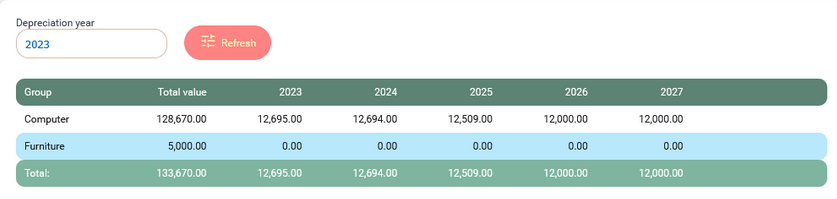
In case you want to find out how many assets are there within an asset group, click on the asset group and it will drill down to the asset level. The system will show you the depreciation for each asset. Click on an asset row and the full depreciation schedule (for that particular asset) will appear on the screen.
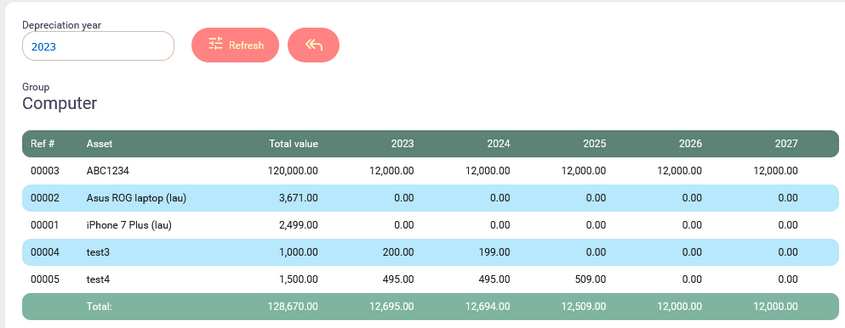
You may also want to view the asset detail, just click on Asset details button to view it.
To post yearly depreciation
Since the depreciation schedule calculation has been taken care of by the system, this makes posting the yearly depreciation journal become very easy.
Here's the steps to post yearly depreciation:
-
Choose the Depreciation option from the main menu (on the left).
-
Choose the year of the depreciation that you want to post a journal entry.
-
At the top right corner, click on the three vertical dot icons and a popup will appear. Click on the “Post depreciation” option to post the depreciation to the Profit & Loss account by using a journal entry.

Here's a sample of a journal entry which was automatically generated by the system. Review the line items and see if there is anything missing or extra. Once you have confirmed that all assets have been included in this journal, choose the Submitted option in the Status field and click Save option (located at the top right).
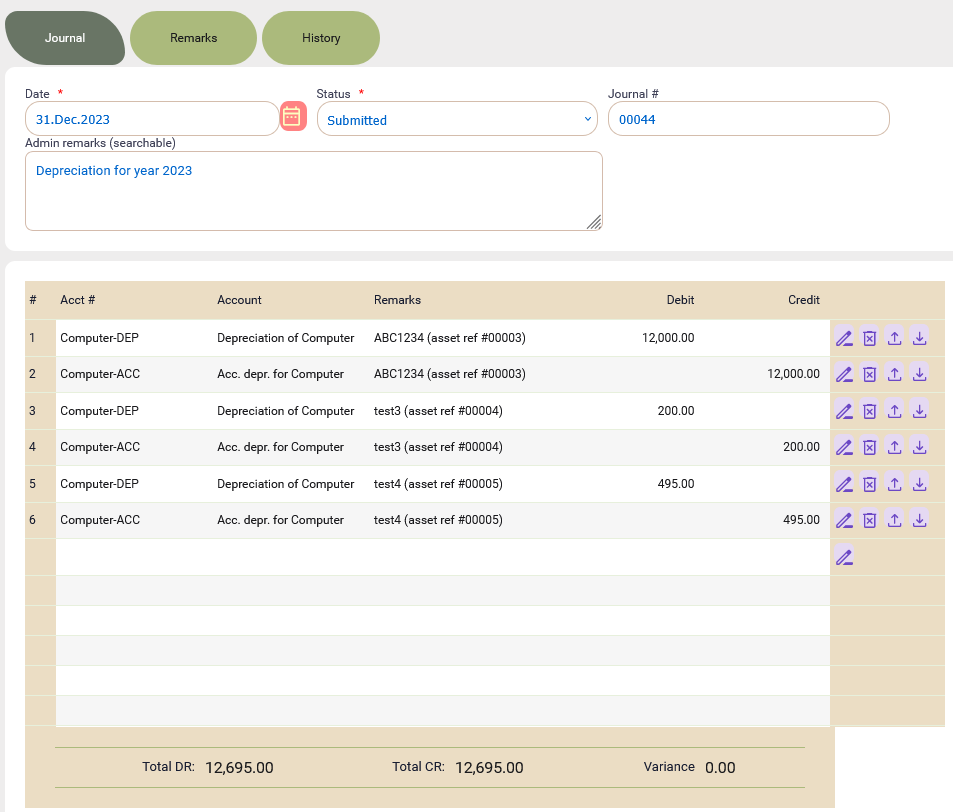
Basically, you don't need to calculate anything manually because all asset details have been captured and managed by BitzButler. We help you to extract the details and create the journal entry.
Dispose an asset
Our system can handle asset disposal as well. For example, if an asset has retired or is not functioning any more, these assets will have to be “disposed” or sold to another person.
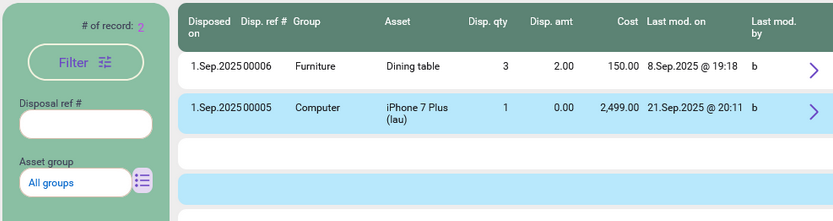
You will have to key in the details into the asset disposal entry screen and save it.
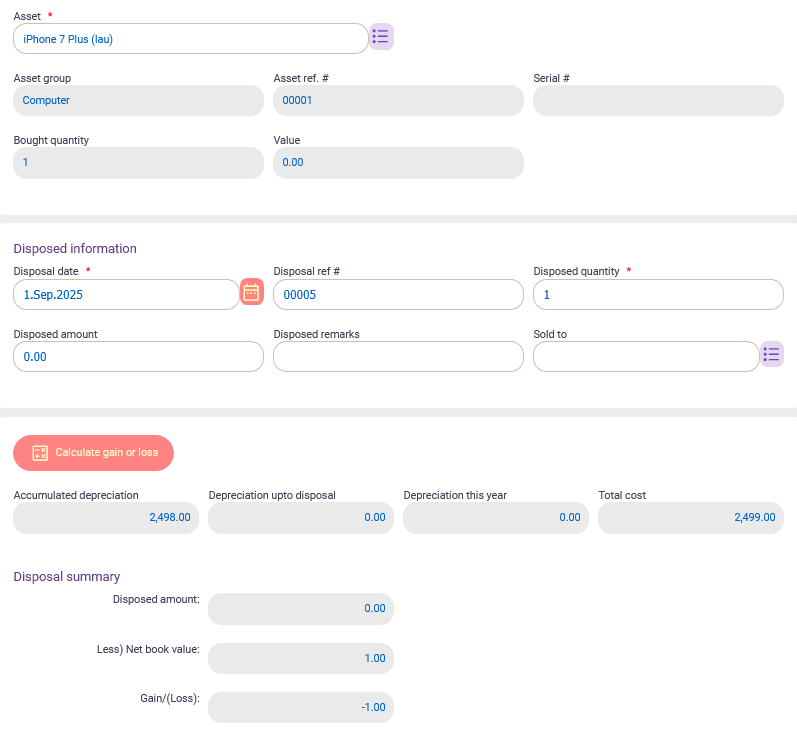
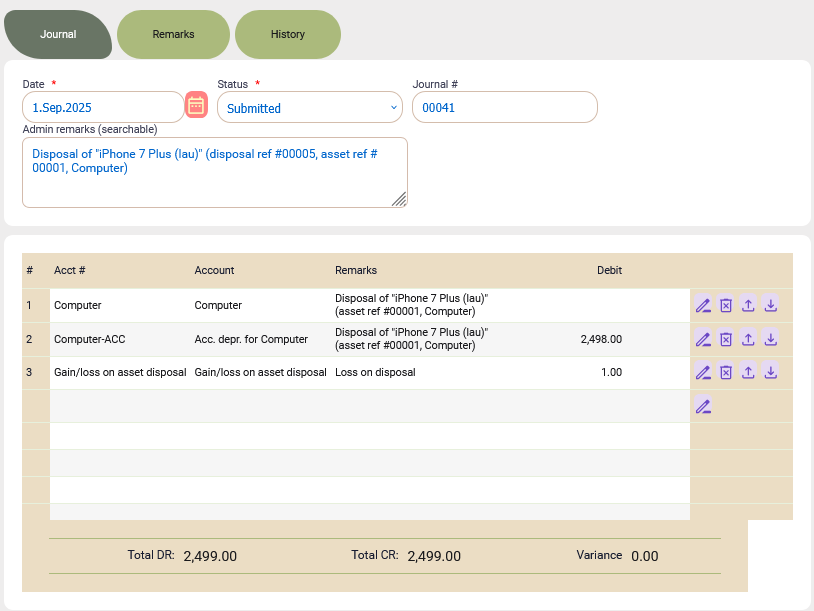
At the top right corner, click on the three vertical dot icons and then choose the “Post depreciation” option. A journal entry will be posted. As a result, you don't need to manually calculate the disposal gain/loss and total depreciation value. You don't need to know what sort of details that are required to be entered in the journal entry.
Here's an example of the journal entry for asset disposal.
Summary
For security reasons, the accountant may grant the permission to the staff and block others from accessing the asset register. This is useful when your account department has many staff.
On top of that, any changes to the asset record will have an audit trail. It allows you to review what has been done to the asset.
Believe it or not, you don't need to be an expert in managing the asset any more. BitzButler helps you in organizing your asset, calculating the asset depreciation, asset disposal and posting journal entry. This is a time saver and a great step in enhancing your business operation.
Start tracking your Assets for Free. No credit card needed to sign up.
