How BitzButler Accounting works its magic on Chart of Accounts setup
Our BitzButler organizes your day, so you rest like a champ! 😊
Save time. Stay compliant with lesser resources. Plan smarter.
Ready to simplify?
Table of contents
-
- Q: I'm worry because I don't have any accounting knowledge and experience
- Q: What happened after I have signed up with BitzButler?
- Q: Can my accountant edit the chart of account by replacing the default chart of account?
- Q: Can you show me an example how you have automated the account creation process?
- Q: What is the benefits on automated account creation?
- Q: What is the problem in automated account creation?
- Q: Where can I learn more about setting up Chart of Account?
📝 Key Takeaways
-
No Accounting knowledge Needed: BitzButler is designed for owners, not just bookkeepers.🍰
-
Timer Saver: BitzButler is designed to speed up every data entry and reporting.⏰
-
Stay Tax-Ready: avoid year-end stress with organized, real-time records.💪
-
Instant Setup: nove from messy to a clean dashboard in minutes.🎉
What is a Chart of Accounts?
Imagine your company's money is a big pile of LEGO bricks — bills, loans, equipment, sales, and etc. The Chart of Accounts (COA) is like the instruction booklet that tells you which bin to drop each brick into so, at the end, you can build two pictures:
- Profit & Loss – "Did we make money or lose money this month?"
- Balance Sheet – "What do we own (cash, PCs, inventory), owe (loans, unpaid bills), and have left over (investment + profit kept in the biz) right now?"
The Chart of Accounts (COA) is a way to organize your company’s activities and data so they show up clearly in the financial statements.
- Without the COA, your finances could end up a total mess—like receipts piled up on a desk.
- With it, every dollar has a home, and your reports actually make sense.
Here’s the fun part about COA: every accountant has their own preferred way to sort the bins. For example:
- Accountant A likes tiny bins: "paper clips", "printer ink", "cloud storage".
- Accountant B prefers big bins: "All office stuff goes here."
Either way works. It depends on the accountant style, your industry, and what kind of reports you actually look at. The bottom line is, the COA is like your company's financial filing cabinet. Keep it simple enough to use every day, but smart enough to grow with your biz.
FAQ
Q: I'm worry because I don't have any accounting knowledge and experience
A: Here are some reasons why you can count on us: all other data entry processes including posting of asset records, issuing an invoice, have the invisible accounting processes behind the scene. This simplified the data posting and set up in the front end and removed the burden from the end user like you. As a result, you can operate the front end with minimal accounting knowledge. In case there is anything that your accountant does not agree with, he can always access the powerful and flexible back end and make the necessary changes.
Q: What happened after I have signed up with BitzButler?
A: Once you have signed up with BitzButler, the commonly used accounts will be created automatically. For example, the bank account, sales account, etc.
Q: Can my accountant edit the chart of account by replacing the default chart of account?
A: Yes. Your accountant allows you to edit the charge of the account at any time. The best thing is that all changes have an audit trail which will be helpful in tracing if any issue arises.
Q: Can you show me an example how you have automated the account creation process?
A: Please refer to: Smart, behind-the-scenes magic — no accounting degree required!
Q: What is the benefits on automated account creation?
A: With the magical guidance to the users through account creation, no in depth accounting knowledge is required — this significantly reduces the burden from everyone. It also speeds up setting up Courses and Items (or products) and standardizing the account naming convention.
Q: What is the problem in automated account creation?
Q: Some organizations use a standardized Chart of Accounts. In this case, the auto-creation feature won’t be much help — it just doesn’t fit your setup. Auto-creating accounts sounds helpful, but it can add lots of unnecessary accounts that make your Profit & Loss and Balance Sheet feel cluttered and confusing — like a closet stuffed with random stuff.
Q: Where can I learn more about setting up Chart of Account?
A: To learn more on which account should be used, it depends on which country you are from. Here's are some standards that we should follow:
-
International Financial Reporting Standards (IFRS) - most of the countries follow this standard that includes Malaysia (https://www.masb.org.my/).
-
Generally Accepted Accounting Principles (GAAP) - it is used in the United States (https://accountingfoundation.org/).
Notes: the final reports generated by the accounting system are not equivalent to the reports for income tax filing (which has tax allowance requirements to follow). For example, the depreciation (in the final reports are generated by the accounting system) VS capital allowance (the policies set up by the LHDN/IRB).
BitzButler Accounting System
We built an Accounting System to simplify the setting up of a Chart of Account for everyone.
What is the problem?
Setting up a Course or Item usually requires accounting knowledge, which can feel overwhelming if you're not an accountant.
Here’s what’s involved:
- Create an Income account (where sales money goes).
- Create a COGS account (Cost of Goods Sold – what it costs you to deliver the course/item).
- Create a Discount account (to track price reductions, promotions).
Only after these three accounts are set up can you finish creating the Course or Item.
The problem?
It’s a long, manual, and time-consuming process — especially for non-accountants who just want to list a product or service and start selling.
Smart, behind-the-scenes magic — no accounting degree required!🤖
Here is some examples to explain how we have automated the account creation:
-
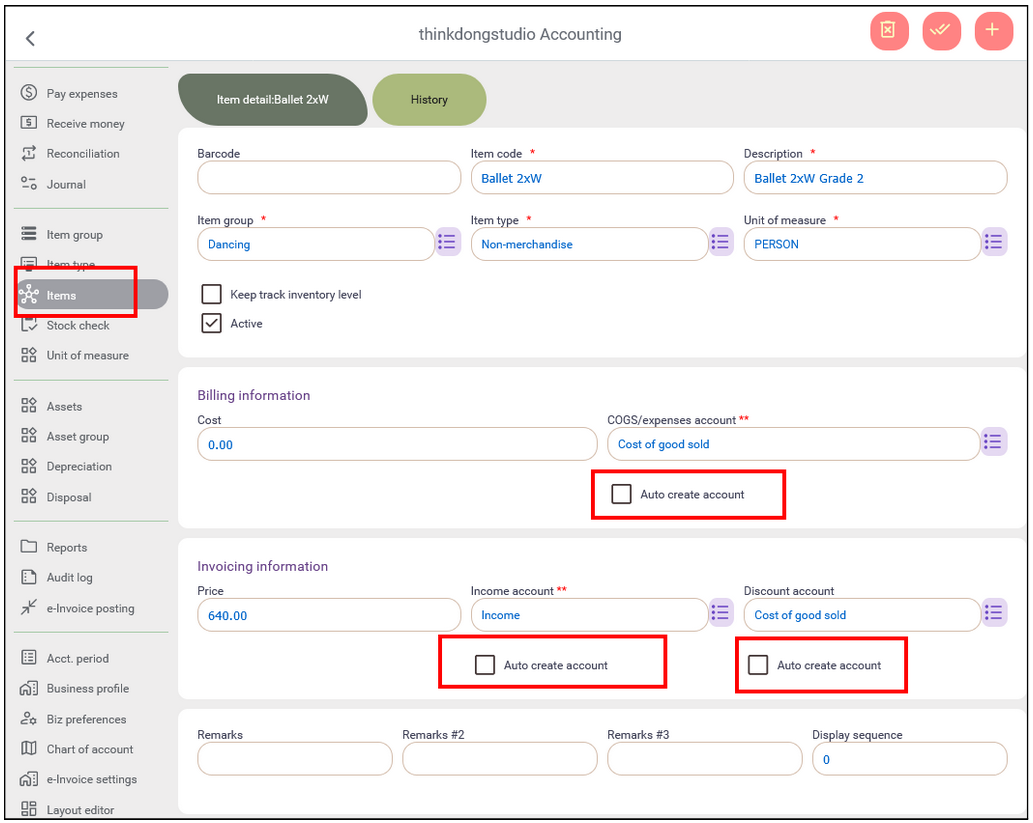
To create an inventory item in the Accounting\Item setup, it is more flexible. You get two easy options to speed things up:
- "Auto-create account" – let the system instantly make the Income, COGS, and Discount accounts for you.
- Pick manually – choose an account for Income, COGS, and Discount fields.
-
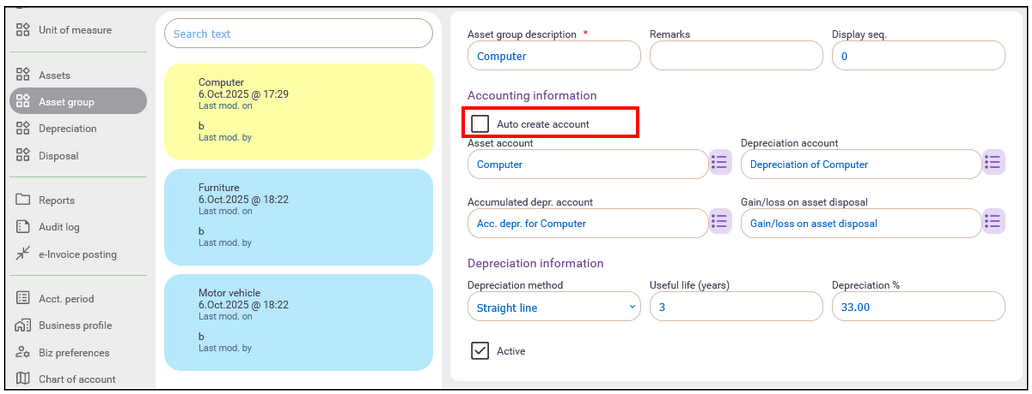
The auto-create account feature is also available in Asset Group setup.
- Want speed? Turn on auto-create — done!
- Prefer full control? You can maintain the Chart of Accounts manually — just create these four accounts for each Asset Group.
-
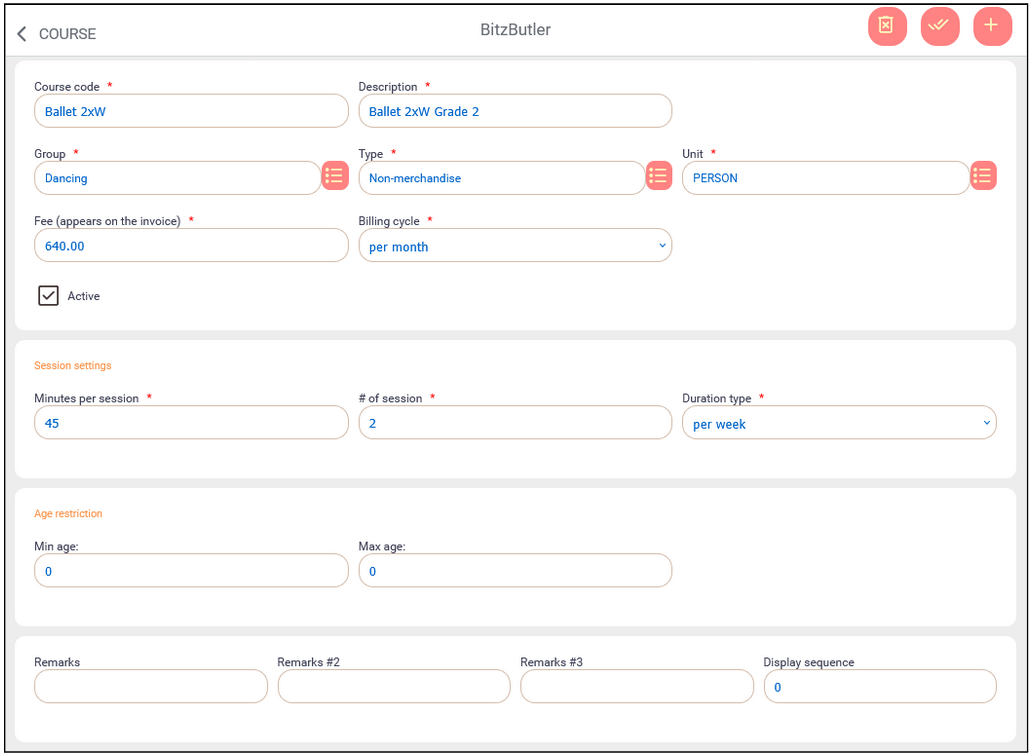
In the Course setup section of our BitzButler Accounting, we've hidden the accounting fields (see the desktop view as shown below). As a result, you can finish setup in minutes without the need to create an Income account, or COGS account. So you can focus on teaching or selling — not bookkeeping.
Summary
BitzButler gives you a magic wand in creating new accounts - fast, easy and you can be a hero too.
Want even more automation? Just drop us a message! 😊
We’ll see if your idea is a smart win for most users — if it is, we’ll automate it!
Start bookkeep your data for Free. No credit card needed to sign up.
