Stay on top of cash flow: invoice payment tracking in BitzButler Accounting

Say bye to paper chaos, old-school receipt books, and manual headaches! Hop on our system ride for a smoother biz and teaching flow (be pro a bit go paperless lah 😆). Let's goooooo!! 🥳
Ready to simplify?
Table of contents
📝 Key Takeaways
-
Prevent due invoices from growing - identify due invoices before the operation expenses hitting your bottom line. 💸
-
Timer Saver - BitzButler is designed to speed up every data entry and reporting. ⏰
-
No Accounting knowledge Needed - BitzButler is designed for owners, not just bookkeepers.🍰
-
Instant Setup - move from messy sales receipt in spreadsheet to a clean dashboard in minutes.🎉
Overview
Our software allows users to track invoice payments on mobile and desktop computers.
How to Check Invoice Payment Status
Ever sent out a batch of invoices only to wonder, "Did that parent pay for last month’s fee and costume yet?" Checking invoice payment status shouldn't feel like hunting for lost sheet music—it's a simple step in BitzButler Accounting that keeps cash flow steady and stress low. In our BitzButler Accounting system, you can instantly see if an invoice is unpaid, partially paid, or fully cleared — so you can focus on lesson plans instead of chasing payments. Best of all? It's mobile-friendly—peek from your phone or tablet during a coffee break between classes.
Why Bother Checking Payment Status Regularly?
For ballet and music instructors juggling group classes, privates, and walk-ins, overlooked payments can add up fast. Spotting a “Pending” invoice early lets you send a gentle nudge to reduce payment delays. That means more funds for new props, mirrors, studio upgrades, buying new products from the supplier. It also reveals patterns: Which customer always pays on time? Who needs a payment plan? This insight turns your BitzButler Accounting system into a smart studio assistant, keeping operations smooth and parents happy.
In summary, if the total due invoice amount (i.e., cash in) is greater than the total operation expenses and due to suppliers (i.e., cash out), then the business is facing a higher risk of not being able to pay the debts. As a result, the business will have the following situations:
- Inject new capital - this is the easiest way to rescue the business.
- Borrow loan from bank - this option requires a longer way to get the money because it requires lots of supporting documents and approval from the bank.
- Take legal action against the customer - the legal action is not free and you might end up accumulating more operating expenses.
- Closed down the business - this is the last resort if there is no way to recover the cash flow problem.
When to Check: Timing Tips for Busy Schedules
- Weekly - check on Mondays to see who paid over the weekend.
- Post-reminder - after a text message or email goes out—see if they paid.
- Month-end - before closing books, review all open invoices.
- On-the-spot - parent/student/customer stops you after class: “What’s due?” — Pull it up on your phone.
FAQ
Q: I don’t have any accounting experience or knowledge, will I be able to track the payment status on the invoice?
A: Yes. You may start using our BitzButler Accounting System with minimal or no accounting knowledge. The system will process the collected amount by posting it to the correct account, update the payment status and update the Balance Sheet in real-time. You won't notice their existence.
The best thing is that no formula is required to set up like those who are using a spreadsheet.
Q: Does your system track overdue invoices?
A: Yes. Every customer/student can have different credit term days and credit limits. You can find more information by tapping on the Contact option on the main screen, choose Manage Contact, open the contact that you want to edit and update the Term Days and Credit Limit fields.
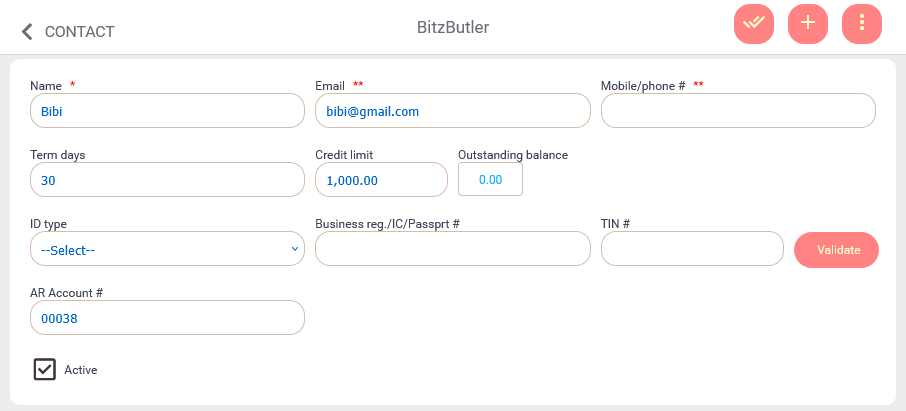
Once you have changed the Term Days and Credit Limit, the due date will be automatically set upon issuing a new invoice.
Notes: the changes on the Term Days will not affect the existing invoice.
Q: Does your system has any report to show the overdue invoice?
A: Yes. For desktop computer user, open the Accounting app → click Reports and then choose any of the following reports:
- AR\Aging report - to view the due invoices grouped by customer.
- AR\Aging summary report - to find out the total due amount by due days for each customer.
- AR\Ledger report - to view the transaction for the selected customer.
Notes: unfortunately, these reports are not available for the mobile phone users.
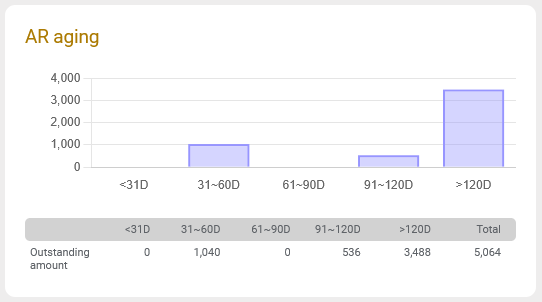
Other than the reports, there is an "AR aging" summary chart on the Accounting System dashboard which gives you an insight on the due amount by age.
Q: Is there any report that has signal in cash flow steady and stress low?
A: Yes. You have to rely on a few reports for this signal and it is advisable to review these reports on a weekly basis.
-
For desktop computer user - open the Accounting app → choose Reports from the main menu. Then, review the following reports:
-
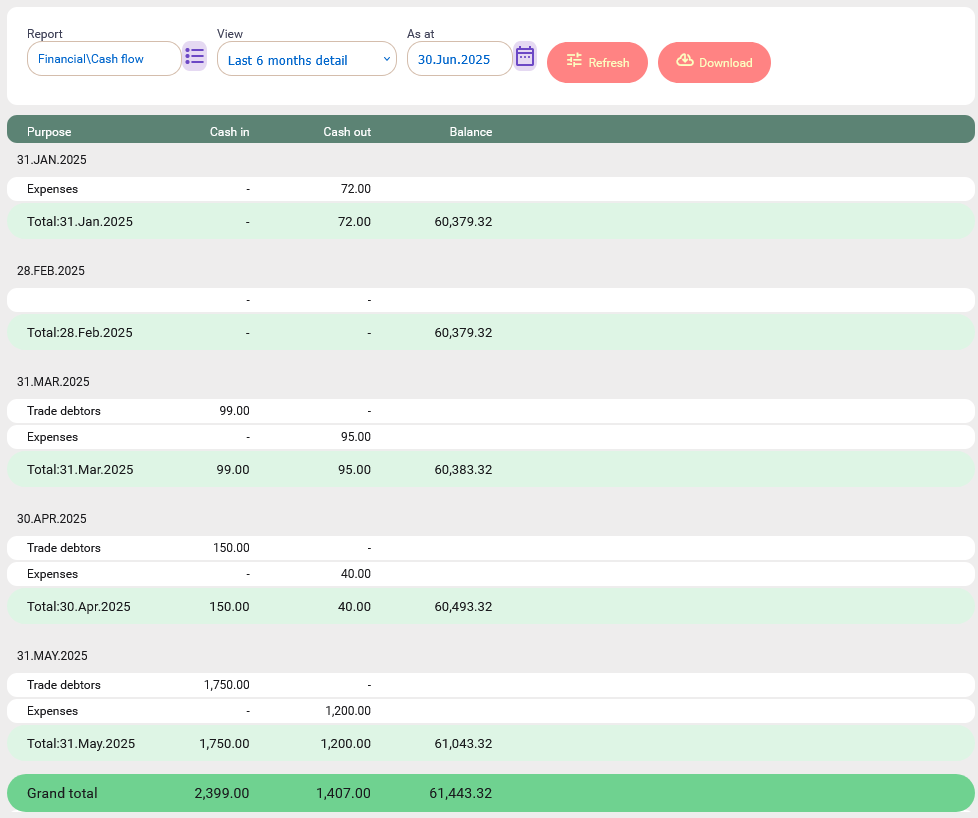
Financial\cash flow\Last 6 months detail - shows the cash in and cash out for the last 6 months in detail grouping.
-
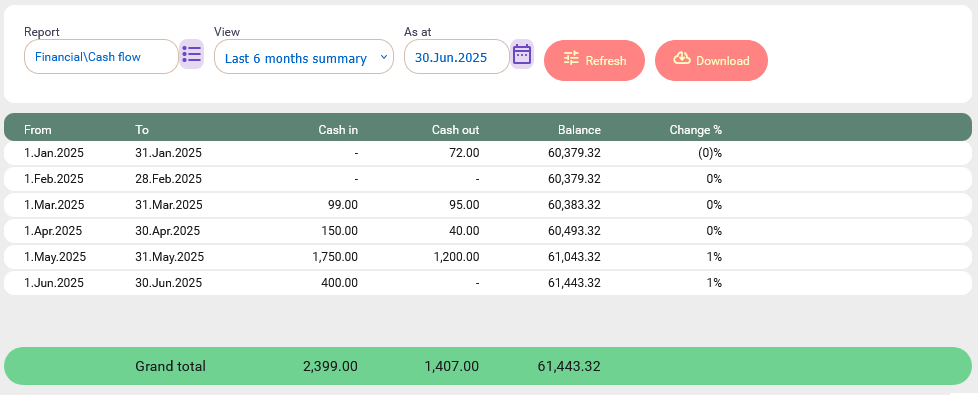
Financial\cash flow\Last 6 months summary - shows the cash in and cash out for the last 6 months in summary.
-
AR\Aging report - to view the due invoices grouped by customer.
-
AR\Aging summary report - to find out the total due amount by due days for each customer.
-
AR\Ledger report - to view the transaction for the selected customer.
-
AP\Aging report - to view the due puchase invoices grouped by supplier.
-
AP\Aging summary report - to find out the total due amount by due days for each supplier.
-
AP\Ledger report - to view the puchase transaction for the selected supplier.
-
For detail explanation, refer to this section: Why Bother Checking Payment Status Regularly?
Notes: unfortunately, these reports are not available for the mobile phone users.
Notes: AR is Accounts Receivable which is related to the sales and collection activities. AP is Accounts Payable which is related to the purchase and payment activities.
BitzButler Accounting System
In BitzButler, it is capable of running on both mobile phone and desktop computer. But, the functions in the mobile phone are limited. If you are looking for a full blown feature, you should use the desktop view.
How to check the payment status on a mobile device?
-
Tap "INVOICE".
-
Tap "Manage Invoice".

-
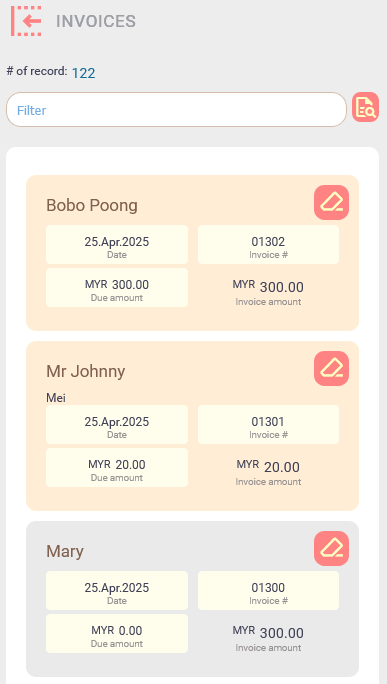
The grey color invoices are paid.
-
And the orange color invoices are due.
To view all due invoices on a mobile phone
-
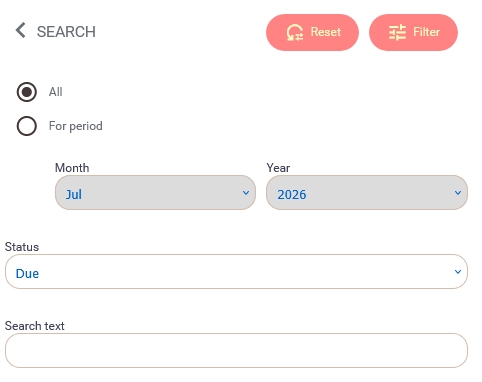
Tap on the advanced filter icon next to the "filter" box.

-
Choose the "Due" option from the Status drop down.
-
Tap on the Filter button (located at the top right).
Finding all due invoices on the desktop view
-
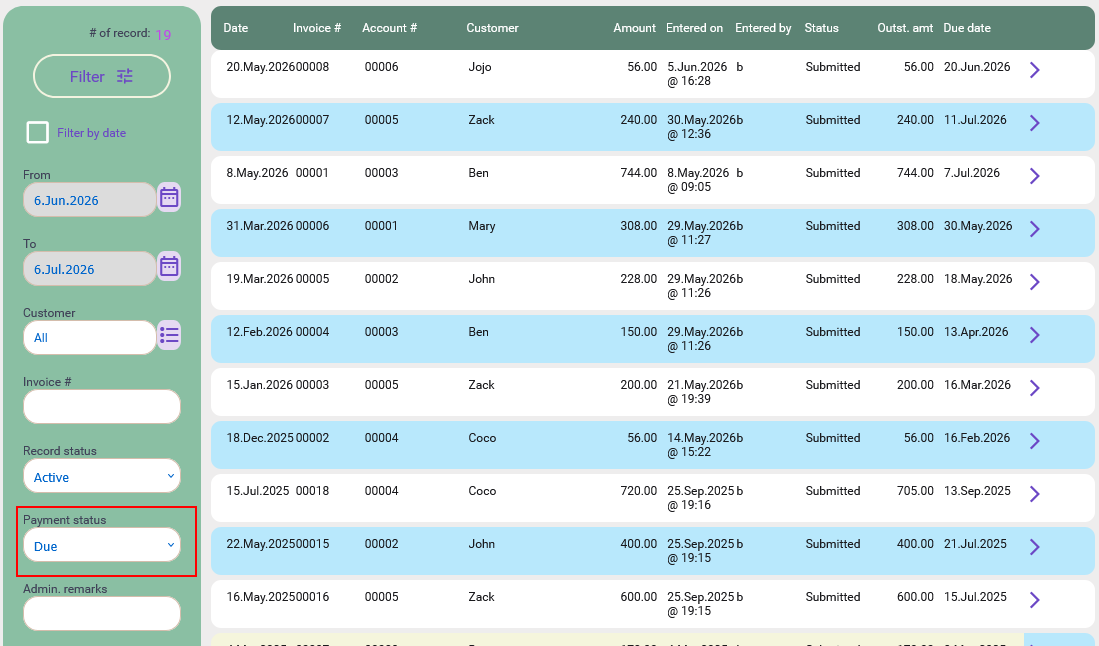
Click on the Invoice menu option.
-
Choose the Due option from the Payment Status drop down.
-
Make sure the "Filter by date" option has been unticked so that all due invoices will appear on the screen.
-
Click on the Filter button (located at top).
Generating the aging reports
The Account Receivable (AR) aging reports are the accounting way to find out how much money due by the customers. In fact, it does not require any accounting knowledge to understand these reports. Basically, these reports contains the invoice that is due, how much and how many days it has due.
For desktop computer user, open the Accounting app → click Reports and then choose any of the following reports:
Notes: all reports can be downloaded into spreadsheet format for further action.
-
AR\Aging report - to view the due invoices grouped by customer.
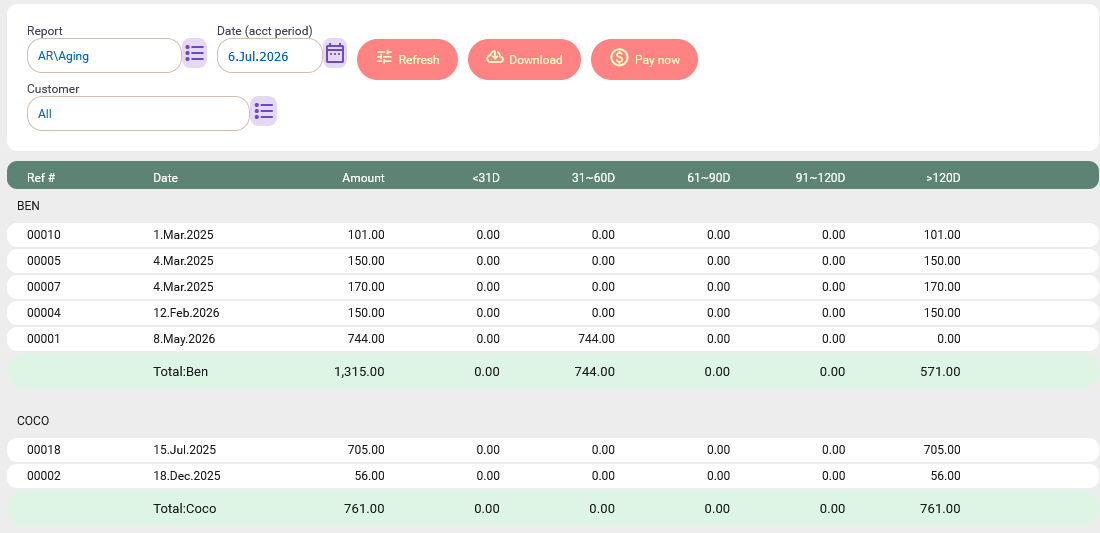
This report is useful for the following situations:
- You want to find out how many due invoices per customer, what is the due amount and how many days it is due.
- To notify the customer on the due invoices.
-
AR\Aging summary report - to find out the total due amount by due days for each customer.
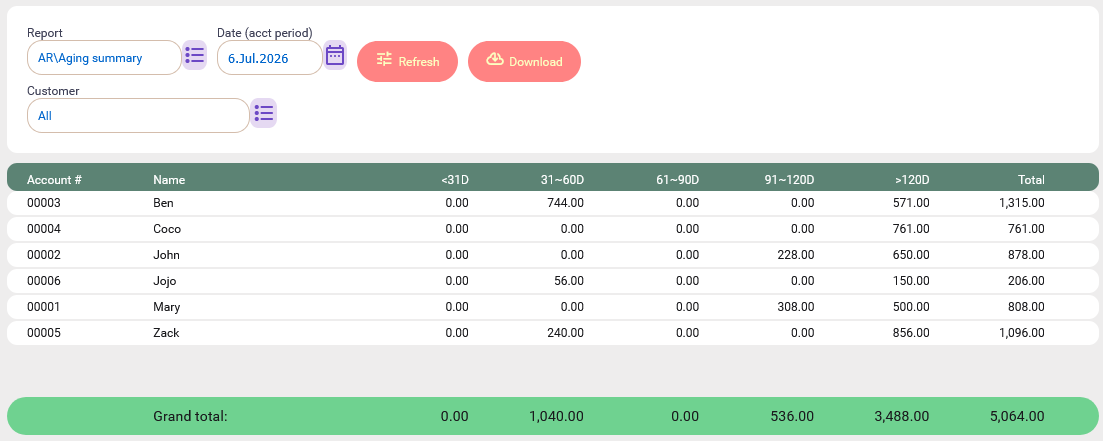
This report is useful for the following situations:
- You want to find out what is the due amount for each customer.
- You want to plan your future cash flow.
- This report is particularly useful to see how many customers might impact your cash flow.
-
AR\Ledger report - to view the transaction for the selected customer.
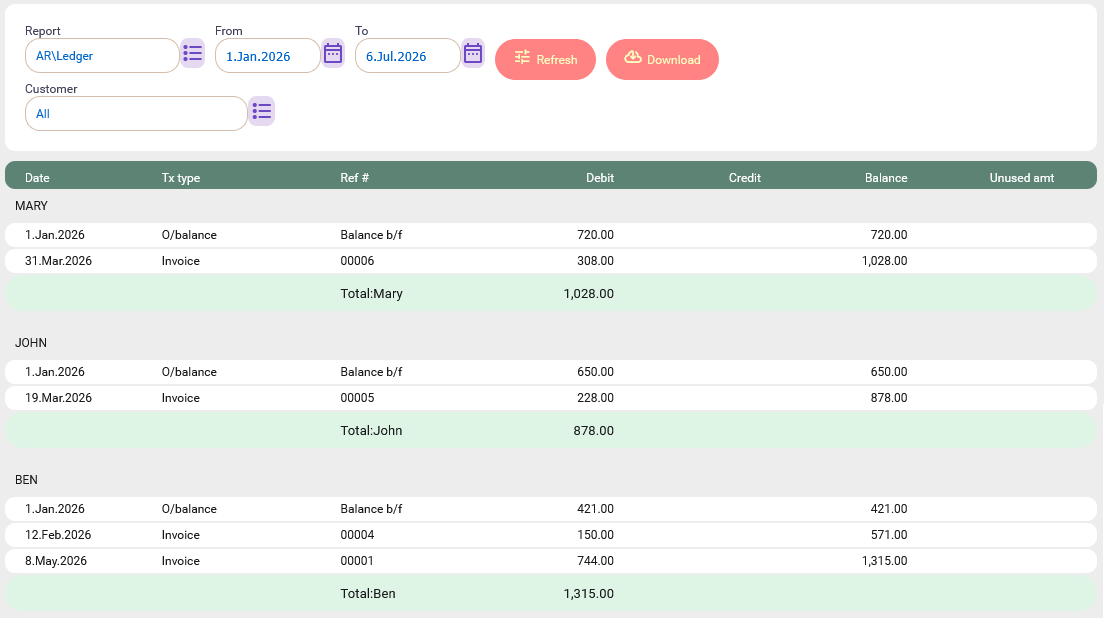
This report is useful for the following situations:
- You want to find out how many sales transactions and payments that has been made by the customer for the given period.
- You want to find out what is the frequency of the customer's activities.
Summary
BitzButler lets users check invoice payment status quickly and easily.
Start bookkeep your data for Free. No credit card needed to sign up.
#Tutorial | #CRM | #AR | #Blog listing
