BitzButler Course and Signup: effortless student sign ups and course management

Wondering if this BitzButler Course and Signup is the right fit for you? Whether you're a music teacher, dance instructor, or run a creative business, this app is designed to help you stay organized, manage students, and grow with ease! 🍰🍭
Ready to dive in? 🥳
Table of contents
📝 Key Takeaways
- Simplifies Class Management - easily schedule and organize your classes all in one place.📆
- Accurate Billing - the sign up information will be used during “generating invoice” (i.e., bulk issue of invoice). Just make sure the fee and first bill date has been keyed in correctly.😮💨
- Data Analysis - allows analyzing the data on which course is more popular and which is less popular. This is important on the strategic planning because the market trend might change and it requires you to conduct the course that has many students.🕵️♂️
- Monitoring Progress - easily monitor student progress and review their entire learning history.🏃♂️➡️
-
Instant Setup: move from messy to a clean dashboard in minutes.🎉
What is “course”?
A course is a service provided by an instructor or coach. It can be private or group-based and focuses on teaching new skills or preparing students for certification. A course is typically an ongoing, multi-session program (a series of lessons) — for example, an 8-week jazz dance course. After completing one level, students can progress by signing up for the next. For some courses, the instructor first evaluates the student's capabilities, then works with them to set goals and create a personalized learning plan.
What is sign up?
Sign ups allow instructors to enroll students in classes, such as music, dance, or swimming, etc. By signing up a student, the instructor will be able to track each student's progress and current skill level. This makes it easy for the instructor to adjust the speed of coaching accordingly.
What is the benefits on using BitzButler Course and Signup system?
- Easier to find out which course is less popular.
- Easier to identify the popular course and open more classes to increase the revenue/income.
- A better way to keep track of the student information and the courses that they have signed up for.
- Improve the retainership by recommending new courses to the student.
FAQ
Q: Can I not key in the course?
A: Without a proper course sign up system, the instructors will have to track monthly billing manually. This is highly time-consuming and often leads to error and inaccuracies. It is recommended to have a computerised system in tracking the data.
Q: Who should manage the course sign up?
A: For small studios, instructors or owners usually manage courses and sign ups directly. Medium-sized studios usually hire an administrator to take care of course management and student registrations.
BizBulter Course and Signup
The instructor may set up a new course with the following steps:
How to create a new course
Open the app → Dashboard → Advanced → Course tab
-
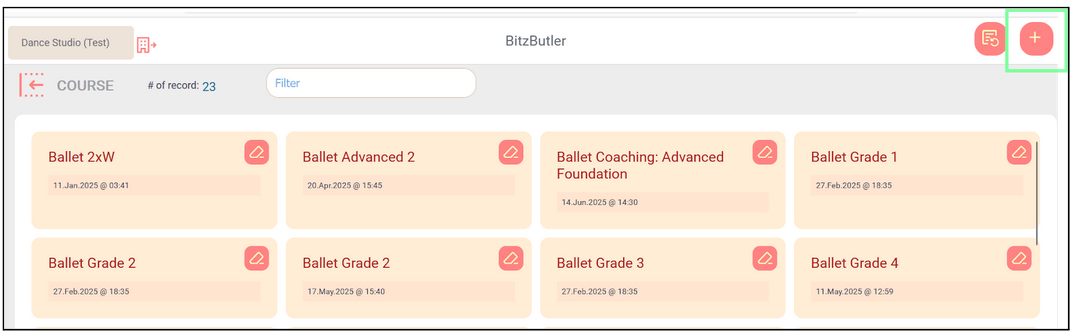
Click the + button to create a new course.
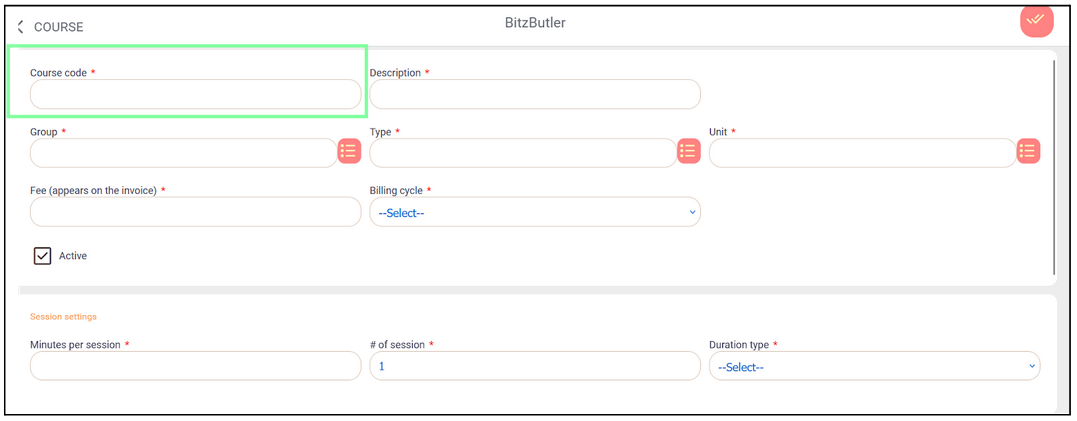
The course setup screen looks like this:
-
There are two ways to design the 'course code'.
2.1. Set the course code the same as the description. This is the easiest and simplest method. Use this convention if you are not running a studio that has many courses.
2.2. To handle more complex courses offered by your studio, you might need a better coding system. Here's the recommended convention to follow:
Main Category (3-4 letters)+ Sub Category (3 letters) + Numeric Digit - Main category - dancing (DAN), swimming (SWM), fitness (FIT) etc. - Sub-category - BLT, ELT, SOC etc. - DAN-BLT - ballet class - DAN-ELT - elite class - DAN-SOC - social dance class - SWM-BEG - beginner swimming class - SWM-PRO - professional swimming for competition - "Numeric digit" - to indicate number of classes per week - DAN-BLT-1 - once a week ballet class - DAN-ELT-3 - three elite classes a week Examples of course codes used for Design Studio: "DSG" is "design" - DSG-LG - logo design. No numeric digit. - DSG-SOM-1 - social media design, 1 posting a week. - DSG-SOM -3- social media design, 3 postings a week. - DSG-POS - poster design. No numeric digit. You may create your own 3-letter course code as it saves your admins the trouble of assigning one. -
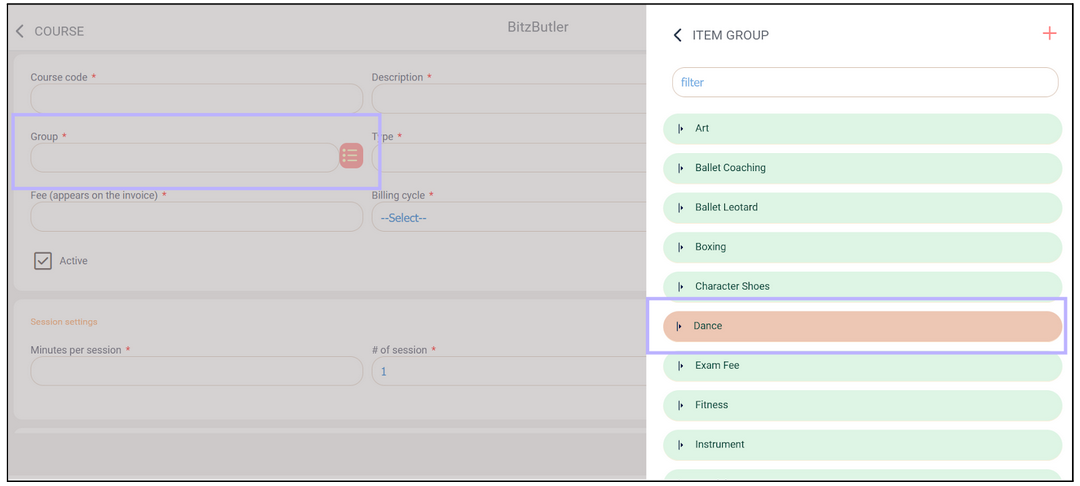
Group - select the group this course belongs to, or create a new group using the ‘+’ button.”
-
Fill in all fields marked with an asterisk (*), then click the ‘Save’ button in the top-right corner.
How to key in new sign up
Open the app → Dashboard → Sign up→ Choose New Sign Up option
-
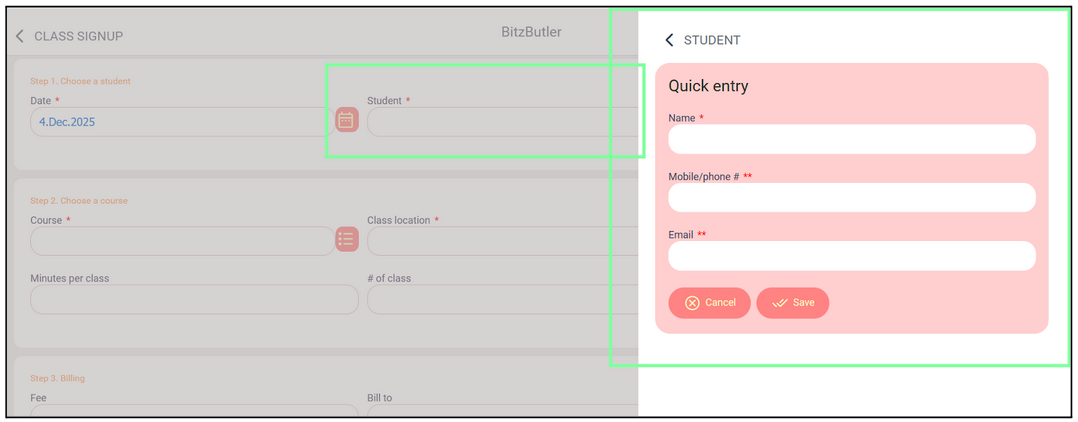
Student - To add a new student, click the ‘+’ button.
Fill in the student information such as Name, Mobile Number, and Email. At least one contact method (mobile or email) is required to save the form.
-
Fill in all fields marked with an asterisk (*), then click the ‘Save’ button in the top-right corner.
Example of a completed sign up form:
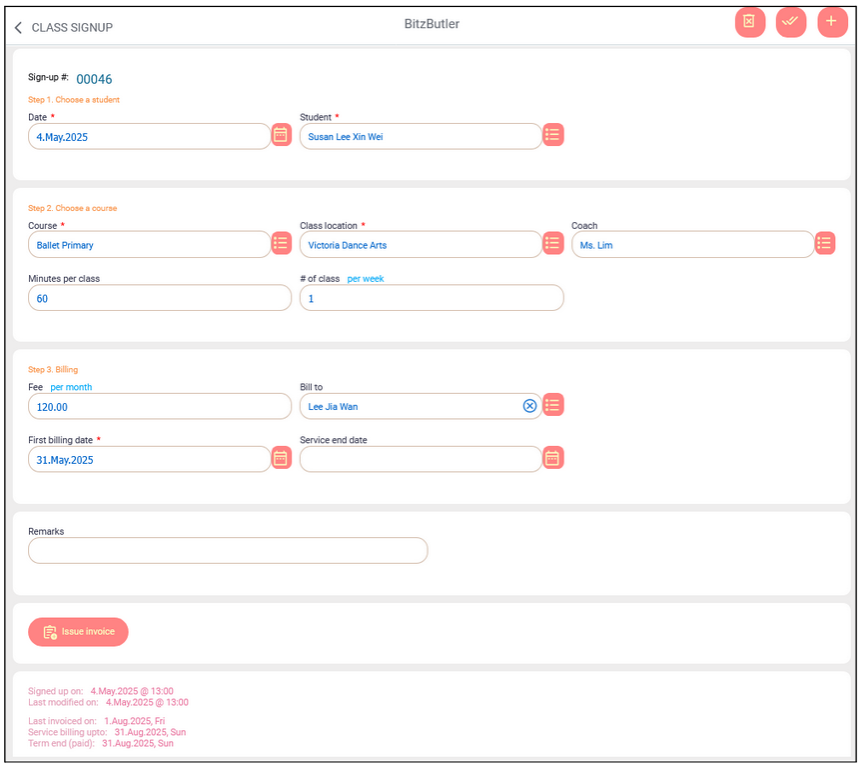
The instructor can issue the invoice as soon as the sign up form is saved, which speeds up the invoicing process.
To view all the sign up, open the app → Dashboard → Sign up→ Choose Manage Sign Up option.
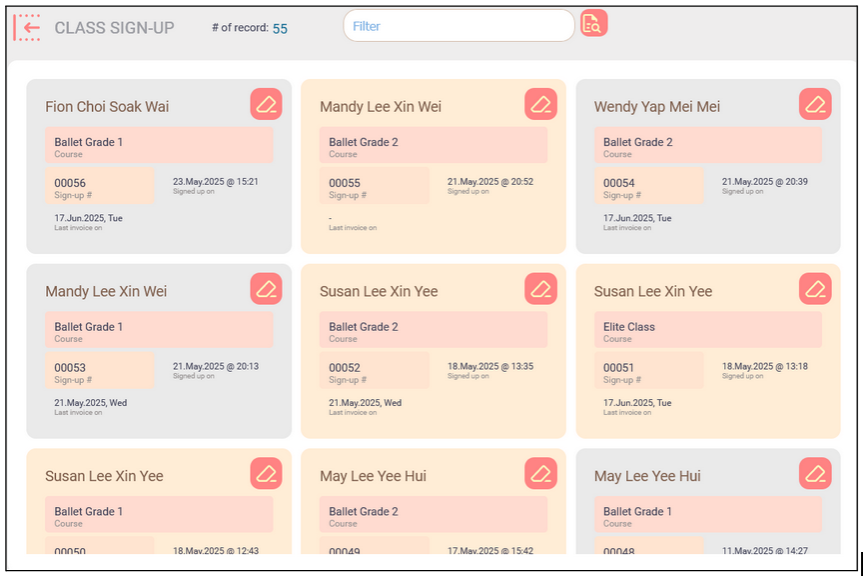
On the sign up screen, you can perform advanced searches — for example, view all sign ups in October 2025 or view all unbilled sign ups in October. The advanced searches will be very helpful so that you don’t have to keep track the billing status manually.
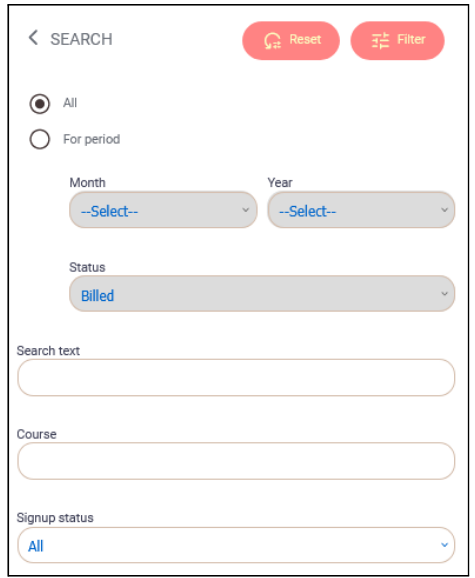
Analyze sign up history
One of the advantages on using a computerised system is that it allows you to analyze your data. By analyzing your data, you will have a better idea on what is going on with your coaching business. On the other hand, it helps to find ways to improve your revenue and sustainability to future proof your business.
Why analyzing your data is important?
-
To improve decision making - this will ease anyone on making a better decision with the analysis.🍬
-
Predict the future growth - with the past years data, you will be able to find out the season of your business and use it to predict the future growth.🪴
-
Performance comparison - with different summary views on your data, it is easier to tell if your coaching business is growing or not.🚀🚂🏍
-
Helps in diagnostic problem - the changes amongst the periods will give you some insights on what has happened in your business. As a result, you can react faster.👨⚕️
How to access the analysis?
On the Class sign up screen, click on the view type drop down list and you will find different sign up views.
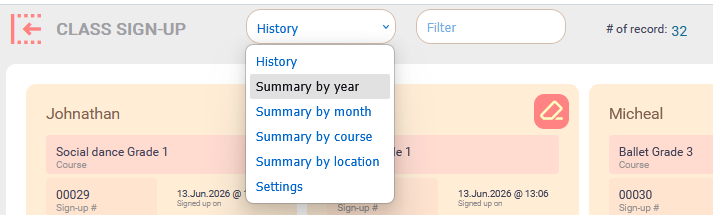
Summary by year view
This view is for comparing your yearly sign up and how much it has increased year after year. The changes in percentage will tell you about the market trend and where it is heading to. 🏄♂️
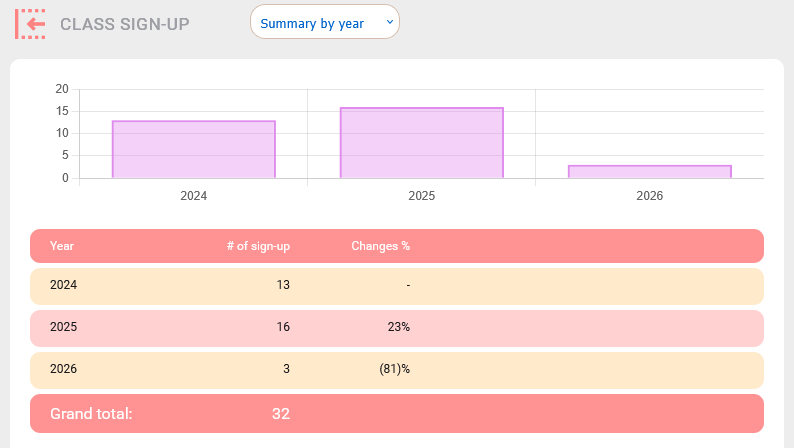
Clicking on any row (i.e., year), it will drill down to 'Summary By Month' view and show the data for that particular year.
Summary by month view
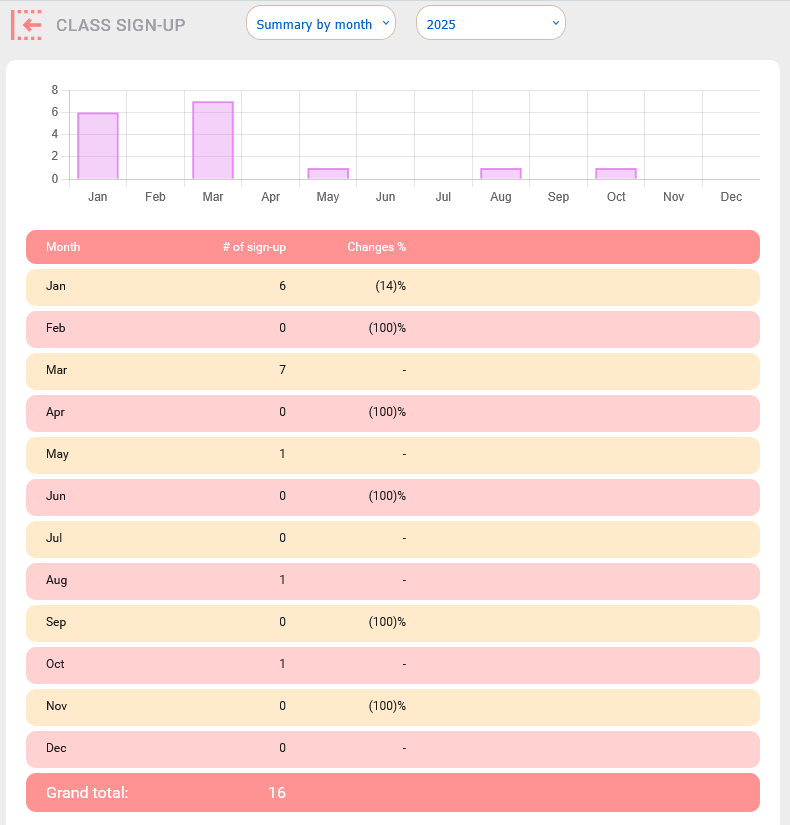
This view is for comparing your monthly sign up and the percentage of changes a month after another month. The changes in percentage will tell you about which season/month that you should get more sign ups. If the percentage of change is more than 50%, you might want to investigate the actual causes which could be your service issue, studio issue or dispute.
Summary by course view
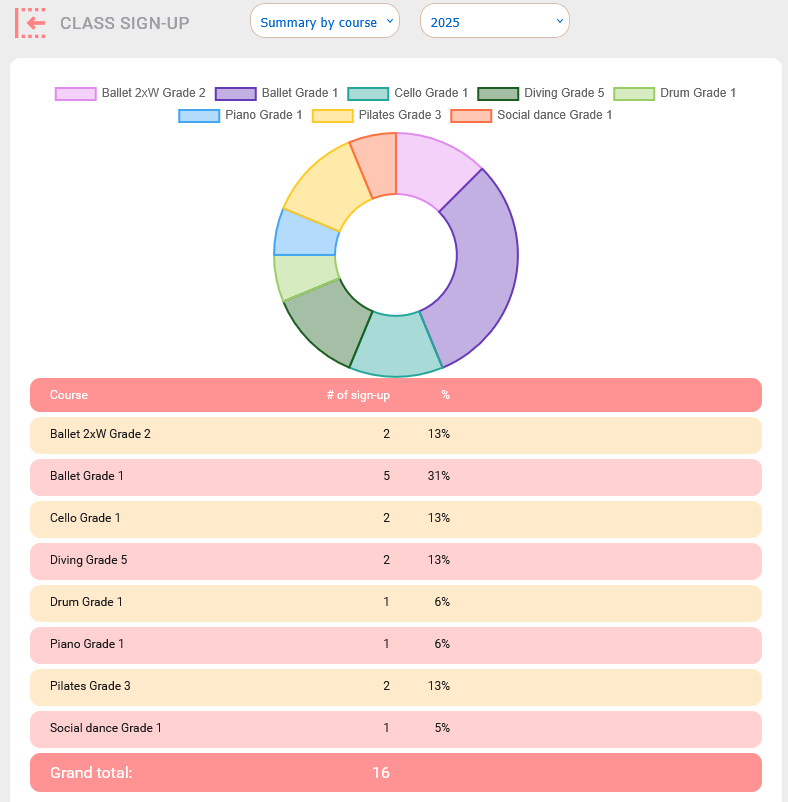
This view gives you an idea on which course is more 'sellable' or popular. You may increase more classes on the popular course that might help in increasing your income.
Summary by location view
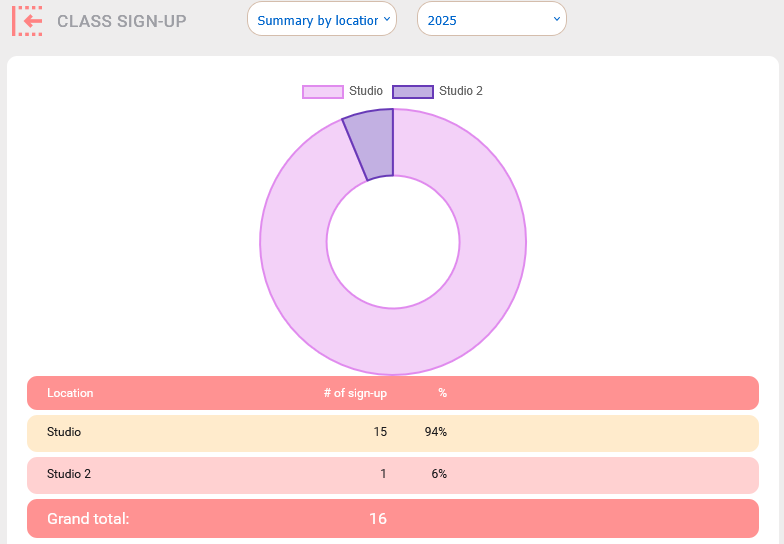
If you are conducting class in multiple locations, this view will be useful to see which location has more sign up or popularity.
Settings view
In this view, it contains the shortcut for all the course related set up such as adding a new coach, course, etc. These shortcuts are convenient and a big time saver.
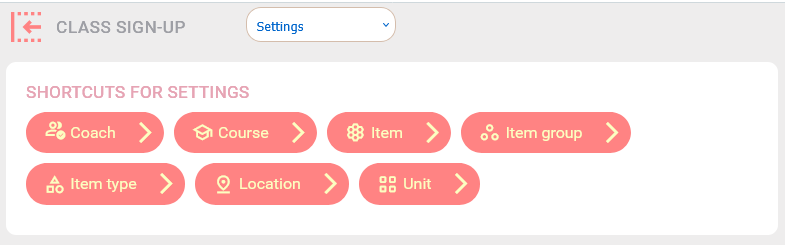
Notes: you will find the same course related set up in the Advanced option on the main screen (after logged in).
Summary
Managing courses and sign ups with BitzButler Course and Signup is a smart, future-proof solution for your business. Our system is designed to simplify your operation. As a result, you can spend more time in the operation rather than doing the manual record keeping.
Start tracking your sign up for Free. No credit card needed to sign up.
